Mad Props!

Omniscience is just a Google-search away.

Login

You're reading Mabsterama, the weblog of Matt Hamilton. Enjoy your stay.

Splitting Text Into Words in SQL Revisited

Has it really been over a week since last I blogged? Oh well ... I've been busy both at work and at home.

Something I've been working on of late is a better routine to split a string into individual words in T-SQL. You might remember my previous effort, which works really well. This one works even better (although it may be a little slower), because it allows for any number of "delimiter" characters (in the @delims variable).

I know a few of my readers are absolute SQL guns, so if there's something in here that doesn't look right, or could work better, feel free to call me on it in the comments section.

Update! It turns out that I need to move the hyphen character in @delims to the end of the string - otherwise it's treating it as a range operator, and matching everything between the characters on either side of it!

CREATE FUNCTION SplitWords(@text varchar(8000))
RETURNS @words TABLE (
pos smallint,
value varchar(8000)
)
AS
BEGIN
SET @text = RTRIM(@text)
 
DECLARE @delims varchar(10)
SET @delims = ' ,:/-'
DECLARE @pos smallint, @i smallint, @s varchar(8000)
 
SET @pos = 1
 
WHILE @pos < LEN(@text)
AND CHARINDEX(SUBSTRING(@text, @pos, 1), @delims) > 0
SET @pos = @pos + 1
 
WHILE @pos <= LEN(@text)
BEGIN
SET @i = PATINDEX('%[' + @delims + ']%',
SUBSTRING(@text, @pos, len(@text) - @pos + 1))
IF @i > 0
BEGIN
SET @i = @i + @pos - 1
IF @i > @pos
BEGIN
-- @i now holds the earliest delimiter in the string
SET @s = SUBSTRING(@text, @pos, @i - @pos)
INSERT INTO @words
VALUES (@pos, @s)
END
SET @pos = @i + 1
 
WHILE @pos < LEN(@text)
AND CHARINDEX(SUBSTRING(@text, @pos, 1), @delims) > 0
SET @pos = @pos + 1
END
ELSE
BEGIN
SET @s = SUBSTRING(@text, @pos, LEN(@text) - @pos + 1)
INSERT INTO @words
VALUES (@pos, @s) SET @pos = LEN(@text) + 1
END
END
-- remove common words that we don't want to search for
DELETE FROM @words
WHERE value IN ('an', 'the', 'of', 'and', '&')
RETURN
END

Phone Games

What is it with people (like the sales girl in the office opposite me) who tell the person on the phone to hang on while they answer their other phone, and answer that with, "Hi, can I call you back? I'm on the other line"???

Surely that's what voicemail is for? It seems that doing the above is impolite to both parties (the original guy you were talking to and the guy you picked up just so you could cut 'em off).

Casting and the foreach Statement

Like most C# programmers, I use the foreach statement a lot. It's a very handy little construct for iterating through collections - especially ones that don't surface an 'indexer' so you can't use a for loop.

Anyway, after doing something like this a few times:


// object[] array = ... foreach (String str in array) { Console.WriteLine(str); }


... I started to wornder why I didn't need to cast each element of the collection to String. I mean, this is an array of object, not an array of String! What's the deal with that?

As a test, I tried adding an int to my array of object, and sure enough the code crashed at runtime with an InvalidCastException. So C# appears to be doing the cast for me. Bizarre!

I ended up doing a quick search on Google to see if someone could explain this behaviour, and lo and behold, someone has!

Anyway, it's a good thing to know, and works in all sorts of situations. For example, you might have a collection of type List<Person> but you know that it's full of Employee objects. You can, therefore, do something like this:


foreach (Employee e in personList) { // ... }


Pretty handy!

Comicster Online Moderation Tool

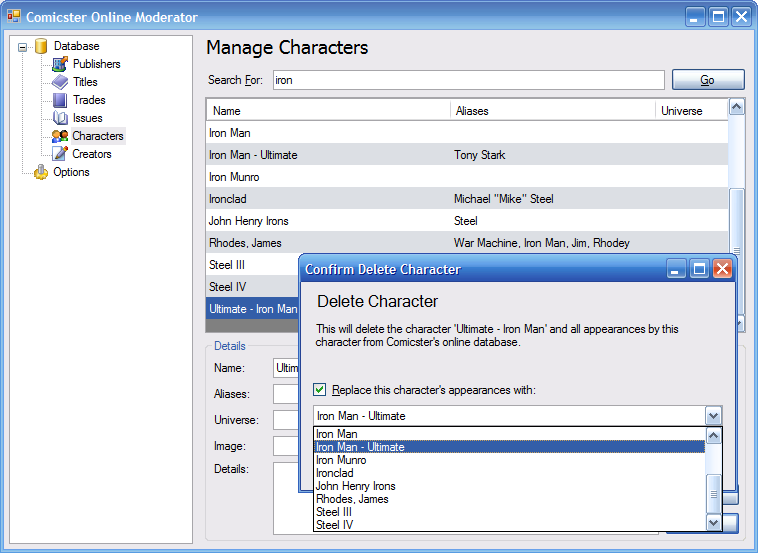
Here's a screenshot of the program I've been working on for the past few nights. It's a tool I can use (and can eventually give to a few trusted users) to maintain the data in Comicster's online database.

In this screenshot I'm deleting a duplicated character (Iron Man) and telling the program to replace him with the original, more correct entry in any comics in which he appears. Click on the thumbnail for the full-sized pic:

Comicster Online Moderator

There are some nice things about this program. For starters, it's pretty much the first .NET program I've ever written that makes complete use of Object DataBinding. Everything except the "search for" TextBox is bound to some field of a custom class. It also makes use of the Validating/Validated events and uses ErrorProviders to give error feedback to the user.

Every web service call in this application happens in a background thread, too - the program never "freezes" while it's searching for data.

I'm really proud of this, especially for the amount of time it has taken to create (about 8 hours in total)!

Live Writer and Forums

Y'know, I really wish I could use Windows Live Writer to post to a forum.

Conversely, I wish Community Server's forums supported the MetaWeblogAPI - even if it was only for new posts to forums.

What do you think?

Implementing a Beta Version using ClickOnce

I've been running some tests this morning on how to do this, since I want to do it with Comicster and I think it'll come in handy with work projects as well. For my own reference, and in case anyone else needs it, I thought I'd document it here.

Let's say you have an application already installed on users' desktops, but you're making a pretty major change and want to roll out a beta version before you give everyone the next update.

In this example I'll use 1.0.1.0 as the version that everyone's currently running, and they all installed that version from http://example.com/install.

Your beta version, then, will be version 1.0.1.1. You don't want it showing up in your users' "check for updates" procedures, so you publish it to http://example.com/beta. Don't forget to use that URL as the "update location" (or don't specify one, in which case it'll use that anyway)! You then contact the users you want to beta test this version and give them the new install location.

Because the beta version has the same application name and is signed with the same code-signing certificate, ClickOnce knows that it's the same app and doesn't install it side-by-side with 1.0.1.0. Instead, it updates your beta testers to version 1.0.1.1.

Your testers might find a few bugs in this version, so you put out version 1.0.1.2. Again, you publish this version to http://example.com/beta and your beta testers will automatically pick this version up.

Things are rocking along now, and you're up to version 1.0.1.8 and ready to go live with all your users. Here's what you do:

  1. Publish version 1.0.1.9 to your original install location, http://example.com/install, so your old users get it in their automatic updates.
  2. Now bump the ClickOnce version back to 1.0.1.9 again, and change the publish destination to http://example.com/beta, but (and here's the trick), set the update location to http://example.com/install.

Your beta users now will run their existing beta version, and it'll see that there's a new 1.0.1.9 version at http://example.com/beta. However, when it attempts to install this, it'll actually grab the 1.0.1.9 "live" version from http://example.com/install! Your beta users are now back on the main branch of the ClickOnce tree!

Hope all these version numbers and URLs don't make this post too confusing. This little trick should serve me well in future versions of Comicster and other ClickOnce-deployed applications, and I hope it works for you too.

Designing Generic Forms

Did you know that Forms and UserControls can derive from a generic type in .NET 2.0?

For example, you might have a base form like this:

public partial class MyGenericForm<T> : Form
{
/* ... */
}

So this form can be constructed with a type at runtime and its behaviour might differ slightly depending on that type.

Why is that handy? Well, the handiness comes in deriving:

public partial class MyIntForm : MyGenericForm<int>
{
/* ... */
}

Now we have a form that specializes with "int" but inherits all the visual design (and other goodies) from MyGenericForm.

Great in theory, but there's one major catch - doing this means you can't switch to the visual form designer for MyIntForm. Visual Studio just isn't smart enough to construct a visual representation of a form that derives from a generic type.

So are we screwed? Not quite yet!

It's actually possible to fool Visual Studio into thinking that this is a standard, everyday form. You do this by defining a type to sit in between MyGenericForm and MyIntForm:

public class MyCustomIntForm : MyGenericForm<int> { }

So this class does bugger all except derive from MyGenericForm and specialize with the "int" type. Then we adjust our original derived form thusly:

public partial class MyIntForm : MyCustomIntForm
{
/* ... */
}

... and voila! Now we have a form that derives (indirectly) from a generic type, and still works in the visual designer!

This example (using int as the specialized type) is a bit contrived, but I've already found one or two uses for this using my own classes as the type the form is based on. Let me know if it helps you!

Props for StudioCoast

Just wanted to give props where they're due.

On Friday I registered the comicster.net domain with our provider for madprops.org, StudioCoast. I figured I'd better register it before someone else did, in case I wanted to do something with it like giving Comicster it's own dedicated site. I set it up to redirect to Comicster's home page here on Mad Props and waited for the DNS entries to propagate.

Saturday arvo I tried it, and it worked just fine.

Late Sunday evening I tried it again, and it wasn't working. Assuming I had done something (you know how it is), I fired off a quick message to StudioCoast to ask what the deal was. I expected a reply by Monday or Tuesday at the latest.

That evening at 8:30 a reply comes from Martin, who explains that it was routine maintenance by the domain provider and that it was all working again.

8:30pm on a Sunday.

These guys are just awesome.

So anyway - if you're after reasonably-priced Australian hosting, and you want excellent service - go check out StudioCoast. I'm not getting paid for this or anything - I just felt that I needed to talk 'em up after a few prompt and helpful replies in a row.

New Acrobat? Who Cares?

Scoble asks where the bloggers are on the new Adobe Acrobat release. I say, we just don't care any more.

Acrobat Reader is a clunky piece of crap. Foxit Reader is infinitely better. Is Acrobat 8 better? I couldn't care less.

Not to mention the fact that Adobe themselves have totally screwed their public image with their childish tantrums over the "Save as PDF" in Office 2007.

Nope - this blogger doesn't give two hoots about Adobe or their dodgy software, and I suspect I'm not alone.

Circular References During Serialization

Wow - here's a doozey for ya.

I've been playing tonight with my new "service oriented" version of Comicster's online database (as detailed here). Tonight's work has involved taking the existing assemblies and, with Visual Web Developer Express, wrapping them in web services.

The first one I tried, PublisherService, was really simple. It just returns an array of Publisher objects. No problem - the XML came back from the web service first time.

The second one, however, turned out to be a killer. TitleService.FindTitles returns an array of Title objects. That in itself isn't a problem. Each Title in that array has a property called Issues, which is itself an array of Issue objects. Still no problem. However, each Issue object has a property called Title, which (you guessed it) links back to the title the issue belongs to. That was the problem.

As soon as the web service tried to serialize the array of Title objects to XML, it threw an exception complaining about a circular reference. Smart! So now I had to work out (a) what was happening and (b) how to fix it.

As you know by now I worked out what was happening. How did I fix it? This might seem like a kludge, but bear with me.

What I did was not populate the Issue.Title property if the issue was being constructed from the TitleService class. So every issue that the TitleService created has Title == null.

The reason I don't consider this too bad a workaround is ... well ... the client already knows the title. The only way he can see that issue is by looking at the title's Issues property! So it's not like I'm losing data.

Leaving Issue.Title as null meant that the web service didn't have to include it in the XML when the class was serialized, so there was no circular reference any more. Problem? Problem solved!

ps. For what it's worth, I did actually try deriving Title from another type (TitleBase) and changing Issue.Title to the TitleBase type. Turns out that the .NET serializer is a bit smarter than that. Even though the property's type was TitleBase, it knew that the object it was pointing to was a fully-fledged Title and serialized it accordingly. Circular references again!