Mad Props!

Omniscience is just a Google-search away.

Login

You're reading Mabsterama, the weblog of Matt Hamilton. Enjoy your stay.

I Forgot to Remember my Password

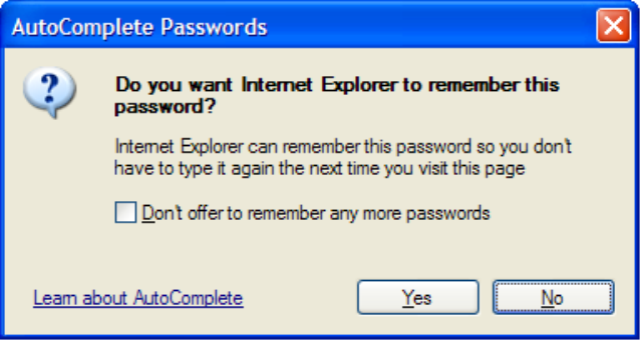
AutoComplete Passwords PromptY'know how Internet Explorer can prompt you to remember the username and password you entered when logging into a site?

Have you ever, for one reason or another, clicked "No" to that prompt, and from then on had to manually type in your password every time you visited that site? I did that recently when I signed into Google Adsense and it's been bugging me for a week.

Today I found out how to get IE to prompt you one more time, so you get a second chance to save your password.

  1. Click into the "username" textbox and hit the down-arrow key to drop down the list of remembered usernames.
  2. Arrow down to the username whose password you didn't save, and hit the "delete" key to remove it from the list.

Simple as that! Now that the username is no longer being remembered, the next time you type in that username and its password, IE will prompt you to save it!

Paste from Visual Studio for Live Writer

I've tried one or two code-formatting plugins for Windows Live Writer, but this one from Doug Stockwell is the best so far. Instead of trying to syntax-highlight the code you're pasting using its own highlighter, it just pastes the RTF contents of the clipboard directly into Writer. That means that whatever colour scheme you're using in Visual Studio is preserved in your blog post. To whit:

 static class ServiceFactory  { // creates a new instance of the given web service reference,  // replacing its host name and url path with values from the  // user's settings  public static T New<T>() where T : HttpWebClientProtocol, new() { string server = Properties.Settings.Default.AppServer; string path = Properties.Settings.Default.AppPath; T service = new T(); service.Timeout = 30000; if (!string.IsNullOrEmpty(server)) { service.Url = Regex.Replace(service.Url, @"http://(?:[^/]*)/(?:[^/]*)/(.*)", @"http://" + server + "/" + path + "/$1"); } return service; } } 

Nice, huh? It even wraps it in a <pre> tag with a class of "code" so you can add some CSS styling if you like. Now all I need is some code worth posting.

Update! Oops! It looks like Community Server is playing silly-buggers with the inline style that the plugin uses to colourise the code! Damn!

Update 2! Ok, editing the post from within Community Server fixed it. Weird. I wonder if it's a metablogapi thing?

Pioneer PDP-507XDA Impressions

First, let me get this out of the way: It's freakin' huge!!!!

The picture quality is outstanding. I thought that such a huge screen would only serve to highlight the inadequacies of the source image, but every channel looks great. Well, every "proper" channel. Which brings me to my next point.

Our house is within range of two different transmitters. One of them has a really good signal, and the other has a really poor signal. It turns out that when the guy scanned the channels, the TV picked up both transmitters, and hence we have two of every channel - one good, one bad.

Here's my first beef with the TV: I can't work out how to remove a channel!!! There is a 'favourite' menu to add your fave channels to, but it seems that you can't delete a channel altogether. I may end up having to nuke all the channels and manually scan the right ones in.

My second beef is a little more trivial. I haven't found any mention of an EPG. You can display the 'now and next' information for the channel you're watching, but not for every channel in a nice tabular format, as you can on most digital set-top-boxes. That's aggravating, even though it's probably a feature I wouldn't use much.

I don't know whether both of these features (delete a channel and EPG) are there and just hard to find, but so far both have eluded me.

Having said that, I am positively rapt with the TV. It's just amazing. And did I mention it's freakin' huge?

Can't wait to fire up a DVD and see what it looks like! Maybe after the AWDNUG meeting tonight.

Update! I've spoken with Pioneer's (surprisingly good) support line, and apparently I'm not going crazy. There is no way to delete individual channels from this TV, nor is there an EPG. Strange but true! Small issues when you factor in just what an amazing piece of kit this baby is.

Blocking IE7

It amuses me that there are so many articles around the traps on how to block the imminent release of Internet Explorer 7 from being automatically deployed onto PCs on your network.

A more secure, easier to use, more standards-compliant version of IE? Oh my god! We can't let that onto our PCs! How dare they try to force that upon us?!!!

TV Arriving Right About ... Now!

While I'm stuck here at work, Sal is taking delivery of our new plasma TV. Free installation is part of the deal, so within the next half-hour or so she'll be kicking back taking in the view. I won't even get to see the damn thing for another seven hours or so. :(

Rest assured, dear reader, that pictures will be forthcoming. Assuming that once I'm settled down in front of the tele I can be coerced into ever getting up again!!!

The next step will be to purchase a new DVD player with HDMI out. I was looking seriously at the Denon DVD-1920, but the 1930 is just around the corner and, for an extra $100 or so, promises better technology and 1080p output. It'll be a hard decision to make, so I'll see if the 1920 plummets in price before I jump in.

Update! Just spoke with Sal on the phone. It's in, and it's glorious!!! Damn it, I wanna go home!!!!

Enumerating Enums

A cool first (well, second if you count the "hello world" post) post from Mitsuru Furuta from Microsoft France about iterating over enum types: Enumerating Enums.

If this is an indication of the quality of Mitsu's ensuing posts (he's apparently going to post a bunch of translated posts from his french blog) then consider me subscribed.

New TV and Mental Freak-Outs

Ok, a couple of little odds-and-ends to blog about from my life in the past week.

Firstly, my new TV. I've been saving up for a flat-panel TV now for the better part of the year, and I've been waiting specifically for the new Pioneer PDP-507XDA 127cm plasma. Anyway, it was due out last week so I went to the local Myer store to see about preordering one.

My mate at Myer (who knew I'd been waiting for this TV for some time) had some very good news for me. The local store had received a single unit to act as a demo unit, and he had permission to sell it, since they didn't have space on the floor for it anyway. So I was all set to be the first kid on my block with this tele.

Only problem is, I didn't have the cash handy - I didn't expect to be getting the unit for another month.

So I transferred a couple of grand from my home-loan into my savings account, which should be in there by Tuesday. Not wanting to wait, though, I figured I'd write 'em a cheque, and by the time that cleared the money would be in there. No such luck - they rang up to get the cheque authorised, and the credit union knocked it back. So my cunning plan failed. Now I'll have to wait 'til one day next week before I can pick it up.

So that's the TV news. Now, health news.

On the drive home yesterday, I started getting weird flashing effects in my right eye. I knew straight away what it was - an ocular migraine. I'd had one about a year ago. I didn't concern myself with it too much, because the last time it happened it went away by itself.

A few minutes into the drive, however, things started getting really weird. It's like my brain disconnected from reality. Everything turned very dream-like, and I had a lot of trouble even talking to my buddy in the car - finding the word I needed to end a sentence etc. It was like I'd lost the power of speech or something.

Freaking out, I told Sal when I got home that I thought I might be going insane. She immediately (cyberchondriac that she is) looked it up on the net, and what do you know? It's a symptom of migraines too! It's known as dysphasia and is usually followed (half and hour or so later) by the headache that we normally associate with migraines. Needless to say that the headache did follow, and it was not pretty.

I'm all good again today, but that was certainly a surreal experience, and not one I'm ready to repeat any time soon.

Quote of the Day

From scrambled on digg.com:

I personally don't think there's a need for the word "atheist". There is no word describing one who does not believe in pixies. It's just common sense.

Musings on Searching for Text in SQL

So I'm still on a bit of a 'full-text search' kick in Sql Server, and I've been thinking about theoretical ways to speed up a search for a substring across an entire table (and multiple columns therein).

As you can see in the previous post, right now I'm simply doing a 'LIKE' comparison on the necessary fields. This works ok on small tables, but as the number of rows increases it's gonna get slow.

So theoretically I could create my own makeshift full-text index, using a custom table. Say a table that listed every individual word, and which row that word appeared in. Something like:

Words (WordID, WordText, ProductID)

Ok - that's not very efficient. We'd need to normalize that a bit. So we can have every unique word, and a second table which matches words to rows in the original table.

Products -> ProductWords (ProductID, WordID) -> Words (WordID, WordText)

Then we'd need a trigger on the original Products table, which nuked any references to the modified row in ProductWords, and then split ProductName (and any other columns we want to search in) into words and re-created the necessary Words and ProductWords rows.

So now we can do a 'LIKE' comparison just in the Words table, and use the ProductWords table to link back to the product we matched.

Obviously this method would only be efficient when the number of distinct words in your Products table is less than the number of actual products - otherwise you're still doing a search across the same number of rows.

What do you think? Do you have ideas on how to perform an efficient text search across a table if you don't have access to Sql Server's full-text indices?

A Poor Man's Full-Text Search with SplitWords

So now you know how to split some text into words. Let me give you an example of how I'm putting this into use, with what I like to call a "poor man's full-text search".

Yes, it's doing a table-scan every time. Yes, it's way inefficient. But still, it returns results quickly (my tables only have a few thousand rows) and sorts the results in such a way that you get the best matches at the top.

I'll use a fictional 'Products' table as an example:


SELECT ProductID, ProductName
FROM dbo.SplitWords(@text) w
INNER JOIN Products p WITH (NOLOCK)
ON p.ProductName LIKE '%' + w.value + '%'
GROUP BY ProductID, ProductName
ORDER BY COUNT(*) DESC, LEN(ProductName), ProductName


So, what are we doing? Well, we're splitting the given "@text" parameter into a table comprising all the individual words in the search text. Then we're joining to our Products table where any row contains one of those words in its "ProductName" field.

Lastly, we're sorting on how many words matched, and the length of the product's name. That means we get the products with the most matches first, and of those, we get the ones that must have matched pretty closely 'coz they only have short names. On the offchance that two product names have the same length, we'll then sort alphabetically on product name.

What do you think? This is doing the job nicely for me in Comicster, since I only have small(ish) tables. One small adjustment you could make would be to order by SUM(LEN(w.value)) DESC rather than COUNT(*). That would mean that products who match longer words bubble to the top. Because let's face it - if you match "widget" then that's gotta be better than if you match "a".