Mad Props!

Omniscience is just a Google-search away.

Login

You're reading Mabsterama, the weblog of Matt Hamilton. Enjoy your stay.

Xbox 360 Stuff

On Sunday, as part of what has become a weekly ritual, Euan and I finished the co-op campaign of Gears of War on Hardcore difficulty. Gears is set up in such a way that playing co-op is identical to playing single-player, and yet it's a whole new game when you've got a mate helping you out instead of an AI. Having the chance to chat with Euan for a few hours while we lay the smackdown on the Locust horde is great fun. For our next trick, we'll be playing all the way through it on Insane difficulty ... which should be ... well, insane.

This week the long-awaited Autumn Dashboard Update (known in the US as the "Spring Dashboard Update") is released, featuring new integration between the Xbox 360 and Windows Live Messenger (as well as a whole swag of other goodies). I don't see myself making too much use out of the instant-messaging feature from the 360 itself, since I don't plan on plugging a keyboard in or buying the new text-input device, but the ability to check who's online from the dashboard, and presumably check who's playing from WLM, should be good. Unless, that is, you're someone who is irrationally afraid of having others know that you're playing Xbox. What's that all about?

AWDNUG This Week

For those who subscribe to this blog but not the AWDNUG Announcements blog, this is a reminder that our monthly meeting of the Albury/Wodonga .NET User Group is this Wednesday.

This month's meeting is a special one, because we have Ron Dunn from Microsoft coming up to give us a presentation on custom workflows in SharePoint Server 2007. We'll see how to create custom workflows using SharePoint Designer as well as in Visual Studio, and Ron has promised that he'll spend more time in VS than in PowerPoint. ;)

Our numbers over the past few months have been pretty poor, so it'd be great to get a decent turn-out to justify Ron's visit (and hopefully spark a few more visits from Microsofties). If you're local, please consider coming along. Check the AWDNUG web site for more information, or just drop me a note.

Silverlight and Development Product Names

A few days ago, Brad Abrams posted this awesome "map" of the Microsoft Silverlight development platform. Silverlight, for those who have been hiding under a rock these last few weeks, is Microsoft's new product for publishing rich content on web sites. Their answer to Adobe's Flash, if you will.

Thinking about Silverlight makes me think of the way Microsoft names its products for developers. When you look at the pieces that make up .NET 3.0, we went from "cool" names like Avalon and Indigo to corporate-sounding names like Windows Presentation Foundation and Windows Communication Foundation. In Silverlight's case, though, it went from having a boring corporate name (Windows Presentation Foundation Everywhere) to the cool name it has now.

Why can't Microsoft have cool names for all their development products? Well, I guess one reason is around intellectual property. If you had to come up with a cool name for every product you develop that was unique enough that it didn't invite a lawsuit from someone with a similarly-named product, you'd very soon be scraping the bottom of the barrel. A few years from now the names won't be quite so "cool" any more.

And let's face it - who wants to pitch a new development project to their boss by letting them know that they'll be creating it with Microsoft Skidmark using the HemorrhagicFever windowing library and the ToeJam networking subsystem?

Zip Your Streams with System.IO.Packaging

I've been reading about how to write data to disk using the System.IO.Packaging namespace in .NET 3.0. This lets you create "packages" which are essentially zip files. You can store whatever you like in 'em, and it all gets neatly wrapped up into a single file.

Comicster right now simply saves its DataSet (using the WriteXml method) through a CompressionStream to disk. That works quite well, and compresses very nicely (since it's XML). The overheads of using a DataSet do make the file slightly bigger than it needs to be, but my collection of over 700 comics clocks in at around 500kB, which is acceptable to me.

With the new .NET 3.0 version of Comicster that I've been toying with, I've more or less abandoned the DataSet, and instead I'm using raw objects. To stream them out to disk I'm using an XmlWriter and manually writing the bits that I want into a FileStream. Uncompressed, the resulting XML file is almost 2MB. Running this through a CompressionStream brings it back down to 290kB - well below the size of the DataSet's compressed file.

Using the System.IO.Packaging.Package class is only a few extra lines of code, and the resulting file is still only 291kB - an acceptable trade-off when you consider that I'm adhering to the zip file standard.

Basically a "package" is made up of "parts" (basically representing the files within the zip). Each "part" has a "GetStream()" method, and you can use your existing code to read to and write from that stream, so it's really easy to shoehorn into legacy code. Here's mine:

public static void Save(Collection collection, string filename) 
{
    string ext = Path.GetExtension(filename).ToLower();
    if (ext == ".cmxx")
    {
        using (var pack = ZipPackage.Open(filename, FileMode.Create))
        {
            var part = pack.CreatePart(_collectionUri,
                System.Net.Mime.MediaTypeNames.Text.Xml, 
                CompressionOption.Maximum);
            Save(collection, part.GetStream());
            pack.CreateRelationship(part.Uri, TargetMode.Internal, 
                _packageRelationshipType); 
        } 
    } 
    else // just save it as raw XML  
    {
        using (var fileStream = new FileStream(filename, FileMode.Create))
        {
            Save(collection, fileStream);
        }
    }
} 

Pretty cool, huh? All I've done is created a ZipPackage, created a single PackagePart within it and then used that part's GetStream method to give me a stream to save my collection to (using the Save method that I had already defined). Note that you can specify on a per-part basis what sort of compression you want to use. This is handy if you're saving already-compressed data (like jpegs) into the package.

The "_collectionUri" identifier is just a constant of type Uri with a value of "/Content/Collection.xml". That tells the zip file where to store that particular stream in the zip.

Considering how easy this, it's a no-brainer to use it if you're creating a .NET 3.0 application that needs to persist data to disk.

ComicBase "Free"

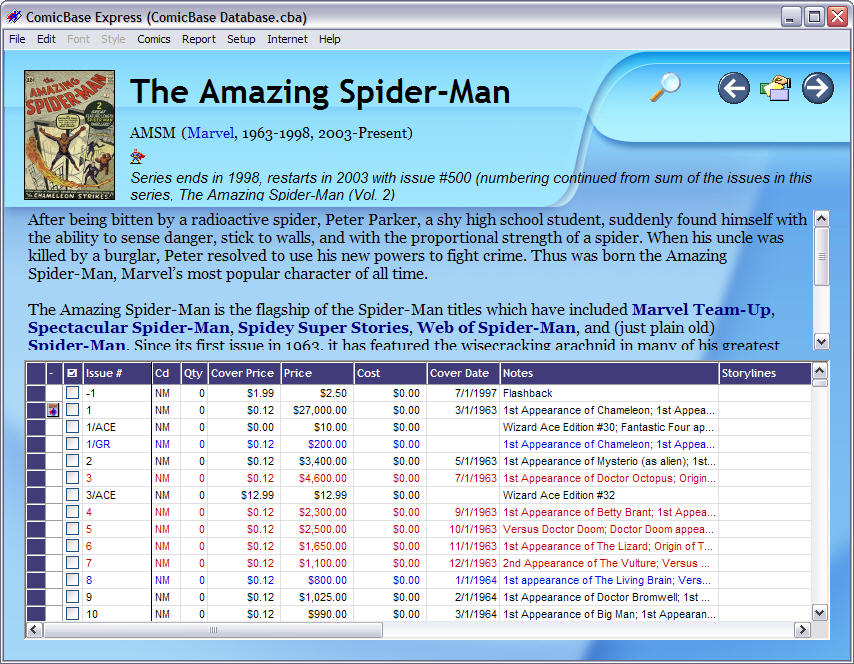
ComicBase FREE I read on Newsarama's forums the other day that ComicBase have released a "free" version called, presumably unironically, ComicBase FREE.

This is essentially a gateway drug into the commercial world of ComicBase's software, which connects you to a large database of comics from which you can build your collection online.

The interesting thing about this new release, though, is that the program limits your collection to 500 issues. I don't consider myself a serious collector by any means, but as of right now my collection stands at 787 issues, not counting those collected in trade-paperback format.

Comicster So just in case anyone had forgotten: Comicster is completely free (although I have received two PayPal donations which were much appreciated), and has no limitations on the size of your collection. Its online database isn't anywhere near the size of ComicBase's, but it's user-generated and thus will only get bigger as more users jump on board.

If you're thinking of trying ComicBase FREE, maybe give Comicster a look as well. Comicster's download clocks in at around 1.4MB, compared to ComicBase's 102MB. And remember: if there's a feature in ComicBase that's stopping you from using Comicster, let me know in our forum and I'll add it. Simple as that.

Knowing What's Out There is Half the Battle

I was inthe kitchen this afternoon when one of my co-workers asked me if I knew anything about putting music to a PowerPoint slideshow. I had to admit that I didn't, and remarked that she'd be hard-pressed to find anyone who did since it's not something many people need to do.

"Ah," she said, "That's because you're all business focused; but sometimes we need it for things like twenty-firsts etc."

I realised then what she was trying to do - make up a slideshow of photos with a soundtrack. She'd apparently been stuffing around for some time trying to convert MP3s to WAV so that PowerPoint could see them etc.

Fifteen minutes later I gave her a quick demonstration of PhotoStory 3 for Windows. Needless to say she was blown away.

Another satisfied customer, but it goes to show: Half the battle when it comes to getting stuff done on computers is knowing what tools are out there to make your work easier. Those of us who are a little more experienced can keep up to date with the help of RSS feeds and the like. The rest? Well, they ask the resident geek when they see him in the kitchen.

WPF - Two Weeks In

After my first two weeks of playing with Windows Presentation Foundation, here are a few random thoughts:

If you want to test something for a null value in XAML, the syntax is "x:Null". That one totally eluded me until someone pointed it out on the forum.

Speaking of the forum, that place is an invaluable resource. Don't be afraid to post really dumb questions there, because the folks answering them are patient and knowledgeable. Josh Smith not only answered one of my questions, he subsequently blogged about it with a concrete example. Awesome.

Pretty much anything is possible in WPF, but some things that we've been spoiled with in Windows Forms aren't available out of the box. The example I've struck already is a "dropdown button" - a toolbar button which, when clicked, displays a popup menu. It's possible to build by hand, but it isn't part of the core control set. There are a few little omissions like this, but nothing that I would consider a showstopper.

It's important to get into the "WPF mindset" when designing your application. If it can be done with data binding rather than inthe code-behind, then do it that way; and if it doesn't look like it can be done, chances are your model isn't correctly designed. I've ended up creating a class-library to work with my Comicster data rather than trying to work with a typed DataSet, and it's amazing how much easier it is. INotifyPropertyChanged and ObservableCollection will become your friends.

Comicster in WPF?

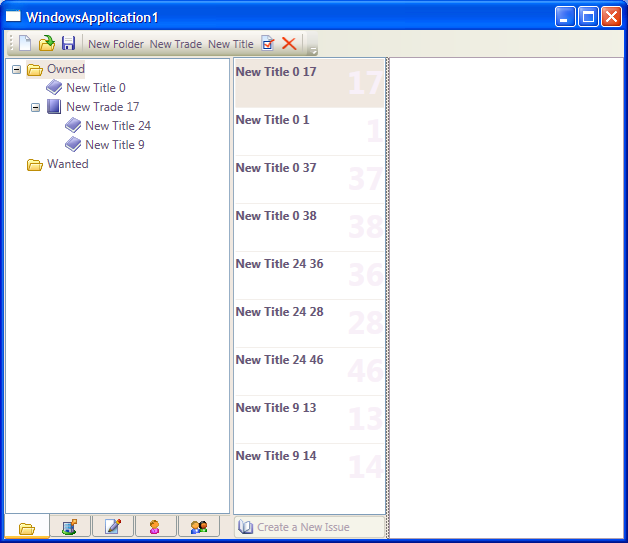
So here's a preview of my little test application that may one day become "Comicster 2.0". What I'm doing is recreating Comicster using Windows Presentation Foundation, but truly from the ground up. Comicster, as you know, was original a way for me to learn .NET 2.0 while at the same time producing something valuable to me. This will be no different - a way to learn .NET 3.0 while producing a new and improved version of Comicster.

Click on the screenshot to embiggen!

Comicster WPF Screenshot

What you see here is a simple application showing a dummy collection. You'll notice that I've taken the "issues" out of the tree altogether, and instead I'm showing them in a list next to the tree. What this allows me to do is a sort of "auto search" for issues. As you can see in the screenshot, I actually have the "Owned" folder selected, and it's showing me every issue I own - regardless of which title or trade they belong to.

 You can also see that underneath the tree I have a series of "tabs". These represent the other elements of your collection - publishers, characters etc. The idea here is that you could switch to the "Characters" tab, click on "Spder-Man" and immediately the list of issues would change to show you all the issues that Spider-Man appears in.

This is all a long way off, but you can see what I'm trying to achieve.

There are going to be a few hurdles along the way as I learn WPF. For example, I will have to change where the "issues" list gets its list of issues from depending on which tab you have selected on the left. And the pane on the right which would show a skinned view of the details for the selected item will have to show the details for either the selected item in the tree or the selected issue in the list, depending on which you clicked on last. I'm sure these are edge cases in WPF so they may not be easy, but what's life without a few challenges?

Have you had experience with WPF (cough Paul Stovell, I know you're reading cough)? Leave me a comment with some ideas of what to post about as I stumble my way through this project!

300 and Cinema Phone-Talkers

Sal and I saw 300 last night, and let me say it lived up to the hype. That was one intense movie. Sal also loved it, which was unexpected since it's such a hardcore "battle" movie.

During the movie a phone started ringing in the row in front of us, about two seats left of me. That's annoying enough, but the owner (a young girl there with her boyfriend) actually answered it! She almost hung up when I stretched across and kicked the back of her seat hard, but even that didn't deter her.

Leaving your phone on in a cinema is bad enough, but every so often someone forgets to turn it off so it's excuseable once in a while. Answering incoming calls is a different story.

I don't blame her, though. She answered a phone during a movie in a theatre, so she's obviously mentally-retarded. It's the boyfriend I blame. For god's sake man, take the phone off the retarded girl before you go into the theatre.

Mabster Does WPF

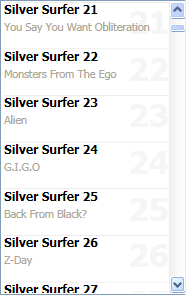
Comics in WPFAfter Joesph Cooney's amazing WPF presentation at Code Camp Oz, I was inspired. I've been keeping track of WPF for years, but never quite had the gumption to try it myself until this week.

I've started small - a simple window with a ListBox showing all the issues in my Comicster collection. I was experimenting with DataTemplates to customize how each issue in the ListBox was displayed, and after a few hours managed to get it to look like the attached picture.

The idea of being able to make templates that you can apply either to data types or directly to lists is very cool. It's a bit hard when you're dealing with a DataSet, because usually your data comes into a bound control as a collection of DataRowView objects, rather than a strongly-typed object. You can get around that (and I have, as you'll see) by binding directly to the "Rows" collection of the table, but that's ugly.

One small tip that I've picked up in the last day or two: If you want to force all the items in your ListBox to the width of the ListBox itself (and hence not require the list to have a horizontal scrollbar) then all you need to do is disable the horizontal scrollbar on the ListBox itself. Here's some sample XAML (the exact code from my application so far):

<ListBox
    Grid.Column="1"
    ScrollViewer.HorizontalScrollBarVisibility="Disabled"
    ItemTemplate="{StaticResource issueTemplate}"
    ItemsSource="{Binding Path=Issues.Rows}"
    /> 

Hope this helps someone out there - it took me ages to discover this.

In the meantime I'll keep reading Joseph's site, and also look back on some of the entries from Beatriz Costa's awesome blog about data binding in WPF.