
Mad Props!

Omniscience is just a Google-search away.

Login

You're reading Mabsterama, the weblog of Matt Hamilton. Enjoy your stay.

Writing a DataSet to XML, Preserving Changes

This post may seem a little old-fashioned nowadays, considering that most developers are looking at WPF and binding to objects rather than the good ol' DataSet, but I found out about this only today and I can see a few projects in my future where it could come in handy.

Y'know how the DataSet class has a couple of methods (WriteXml and ReadXml) for persisting its data to disk?

Did you know that it's possible to preserve any pending changes when you stream the data to XML?

WriteXml has an overload which takes an XmlWriteMode enum as its second parameter. If you pass XmlWriteMode.DiffGram to that, the DataSet gets written to XML in such a way that any added, deleted or modified rows have their changes persisted to the file. Similarly, ReadXml has an overload that takes an XmlReadMode enum, to which you can pass XmlReadMode.DiffGram to read the DataSet back in with its pending changes intact!

Even better: If your tables have a primary key defined, the ReadXml method will perform a smart merge of the data, meaning that you can read in only the changed rows and it'll affect those rows only in your tables, flagging them as inserted, deleted or modified. The reason this is handy is that you can save only the changed rows to XML by first calling DataSet.GetChanges(), and then saving the resulting DataSet to XML instead of the original!

So if you have an application that needs to go offline, but still keep track of changes to data so that when the user reconnects you can upload those changes to your server, this would be a great solution. SQL Server 2005 Compact Edition is another solution (and the one I was originally looking into) but setting up the replication etc is a bit complex for the project in question.

DataSets, eh? They never fail to surprise.

Bridge Climb

Just got back from our two-night stay in beautiful Sydney, where we finally did the bridge climb we got from my folks last Christmas. That's the Sydney Harbour Bridge, for those who didn't realise.

The day started with us walking from our hotel (Citigate Central Sydney - highly recommended!) across the CBD to The Rocks, where we located the BridgeClimb office. We were a good half hour early for our climb, but luckily we were able to get an earlier climb, so our wait time was cut down to only fifteen minutes or so.

There's a bit of rigmarole involved in preparing for the climb. A form to fill out, a breath test for alcohol levels, changing into the tracksuit thing they make you wear - even a metal detector to walk through. Then they give you the rundown on the use of the latch which keeps you connected to a safety rail as you walk around the structure, and the correct procedures for climbing ladders etc. All pretty straight forward.

I must admit that I was a little concerned about how hard the walk would be, despite seeing the competitors on The Biggest Loser doing it, and hearing of elderly people doing it. I'm pleased to say that even for someone as couchbound as myself the walk was a piece of cake. You're just too caught up in the view and the experience to worry about whether your legs are tired.

Our guide, Bernie, was great value. Terrific sense of humour and a real raconteur. Some of the stories he told about the building of the bridge really made me want to look this stuff up and learn more about it.

Once the climb was over we spent the rest of the day walking around the city, and then had tea at Darling Harbour. We even had a chance to wander over to Star City casino and win back some of the day's expenses. A really great day.

I have the rest of the week off (to give my thighs and calves time to recover - just kidding). Should be a great break away from work. At some point I'll scan in the photo we got of Sal and me on top of the bridge and upload it.

Chokoly Disturbed

I was chatting to my boss today and discovered that he'd never heard of choko. Surprised, I mentioned it to my co-worker Julie, and discovered that (although she'd heard of it) she didn't know what it was either!

Suddenly I was struck by the notion that I'd slipped into some parallel universe where choko didn't exist! Thankfully a quick check of wikipedia allayed my fears.

Anyway, the point of this post is that the whole situation reminded me of a short (3.5 minute) film I once saw called Dentally Disturbed. It's worth checking out.

SQL Server Reporting Services: Your Favourite Reports

To make things simpler for our end-users, we have a report in Reporting Services that queries the ReportServer database and presents the users with a simple list of reports. We call it "Report Portal", and it's a lot simpler than the Report Manager UI that you get by default.

Something I've added to it just recently is a section at the top that lists the six reports you run the most often, based on your Windows login. I call it "Your Favourite Reports", and here's the query:

select top 6 c.Name, c.Path from ExecutionLog l with (nolock)  inner join Catalog c with (nolock) on c.ItemID = l.ReportID
and c.Path like '/SomeFolder/%'
and c.Hidden = 0 and c.Name <> 'Report Portal' where l.UserName = @Username group by c.Name, c.Path order by count(*) desc

For the "@Username" parameter, we pass in User!UserID from Reporting Services.

I can recommend this approach - it's a way of giving your users a "menu" of reports that keeps the same "branding" as all your other reports. This "faves" list only adds to the experience.

Handling Events of Child Controls in WPF

My WPF version of Comicster is coming along leaps and bounds, thanks mostly to the helpful folks over on the MSDN WPF forum.

Today I was toying around with DataTemplates for ListBox items, and I wanted to include a Hyperlink (like a LinkLabel for us WinForms folks) in each item. My template looks something like this:

    <DataTemplate x:Key="PublisherItemTemplate">
        <
StackPanel Margin="0,4,0,4">
            <
TextBlock Text="{Binding Name}" Style="{StaticResource ListItemHeaderStyle}" />
            <
TextBlock Style="{StaticResource ListItemDetailStyle}">
                <
Hyperlink NavigateUri="{Binding Uri}">
                    <
TextBlock Text="{Binding Uri}"/>
                </
Hyperlink>
            </
TextBlock>
        </
StackPanel>
    </
DataTemplate>

So as you can see, I'm showing the name of the publisher, and then, underneath it, a link to the publisher's home page (in a property called "Uri").

Problem is ... Hyperlinks by themselves don't really do anything. If you want them to pop open a web browser with the address specified, you need to handle their "RequestNavigating" event and start the process manually. This is all very well, but my template isn't stored inside the main window's XAML file - it's tucked safely away in its own XAML file. That means that it has no "code-behind" in which to handle the event in question.

So what to do? How can I tell the Hyperlink what to do when it's clicked?

Well, it turns out that you can handle the event up in the ListBox itself! Like this:

   <ListBox Name="publisherList"
                 ItemTemplate="{StaticResource PublisherItemTemplate}"
                 ItemsSource="{Binding Publishers}"
                 Hyperlink.RequestNavigate="OpenUri" />

See? I've actually told the ListBox that any time a Hyperlink inside it is clicked, call the "OpenUri" method in my window's code-behind.

This is something I never would have considered trying, and it really makes me wonder what else might be possible using this sort of construct.

So there you go - my WPF lesson learned for today.

Live from Sydney Airport!

Well, the SharePoint APAC Conference is done and dusted, and both Pete and myself really enjoyed it. Well worth the money that the company paid. ;)

Mabster doing the Can-Can Last night's conference dinner was a real event. I expected to turn up to a series of trestle tables and a choice of beef or chicken, but instead they put on a real show. The ballroom at the Hilton was decked out with poker, blackjack and roulette tables, and we were each given $10,000 in fake money to play during dinner. They had a bunch of folks dressed up in a wild-west theme, including a series of can-can girls who managed to get me up on stage to dance with 'em at the start of the night. Pete snapped a photo or two on his phone. You can see one of 'em here, and the other over on Pete's blog.
We kicked off the evening playing roulette, which was heaps of fun but not exactly profitable. Whilst playing, I was surprised to hear my name called out over the microphone. I'd won a prize as part of the random draw! A pair of Microsoft LifeChat LX-3000 headphones. Not bad at all!

We then blew the rest of our chips on the Hold 'em Poker table, which was a blast. Let's put it this way:

  • The two of us combined had fewer chips than any other single person on the table
  • I suck at the game
  • Pete had never played it before nor seen it played

You can imagine how long we lasted. The highlight of that game, and perhaps of the entire trip, was Pete's exalted outburst of "TWO PAIR!" when the river card revealed two pairs in the flop. That is to say, everyone had that same two pair. It was a deliberate joke, but I turned to water and nearly had an aneurysm from laughing.

Today's sessions were again of the high standard set by yesterday. We saw two great sessions by Mike Fitzmaurice about the search architecture of SharePoint 2007. Really gave us some great ideas about where to take our current implementation.

Back to work tomorrow. Post again later!

Live from the APAC SharePoint Conference!

Well, live from the Novotel on Darling Harbour anyway.

Just completed day one at the APAC SharePoint Conference along with Pete, and I have to say that it was a very enjoyable day.

Our day started before sunrise so we could catch the red-eye to Sydney. In fact, Pete had to travel 45 minutes from Corowa to my place first, so he's no doubt struggling by now! The flight was uneventful, and the taxi ride from the airport to the hotel was quite entertaining thanks to a cab driver from Ghana playing Bob Marley and singing along.

The first session (after the opening keynote) was about programmatically accessing SharePoint objects using the object model and web services. For me, this was the highlight of the day. The presenters really knew their stuff and gave clear examples with real-world code samples. The only down side for me was the use of the word "who's" in a comment in one of their code samples where they clearly meant to use "whose". :)

Among the other sessions we attended was an informative session on the Business Data Catalog by Mike Fitzmaurice from Microsoft. This was very valuable in explaining some of the BDC's terminology and mechanics.

Tonight we have the (free!!?!) conference dinner, and then a whole day's worth of sessions again tomorrow before we fly home.

Oh - did I mention that CGI were giving away free lattes in the sponsor's area? Fantastic!

Full-Featured GPS Device

Andrew today was asking my advice on which GPS unit to buy.

Andrew: TomTom has a better interface, but Road Angel has the blackspots, red light cameras, and stationary speed cameras on it

Me: Geez it must be heavy

Just wanted to share that. :)

WPF Menus - WTF?

Have you noticed that all the sample applications for Windows Presentation Foundations have non-standard user interfaces? None of them that I've seen have standard menus or toolbars. They all strive to be "different", shunning the traditional "File" menu.

This is not a bad thing in and of itself - in a lot of ways the traditional menu structure is a bit of a dinosaur and doesn't suit many applications.

Having said that, there will always be applications for which the trusty old "File" menu works well, and Comicster is such an application. Users like the familiarity of "File|Open", "File|Save" etc. So as part of my experiments with WPF over the past few weeks I've been trying to preserve that same traditional feel.

I realise now why none of the demos use traditional menus: They're really hard to get right in WPF.

As an example, I've put together a sample application. It consists of nothing but a few 16x16 png files and the following XAML inside the main window:

<DockPanel>
   <Menu DockPanel.Dock="Top">
      <MenuItem Header="_File">
         <MenuItem Command="ApplicationCommands.New"> 
            <MenuItem.Icon> 
               <Image Source="Resources/new_document_16.png"/>
            </MenuItem.Icon>
         </MenuItem>
         <Separator/>
         <MenuItem Command="ApplicationCommands.Open"> 
            <MenuItem.Icon>
               <Image Source="Resources/open_document_16.png"/>
            </MenuItem.Icon>
         </MenuItem>
         <Separator/> 
         <MenuItem Command="ApplicationCommands.Save"> 
            <MenuItem.Icon> 
               <Image Source="Resources/save_16.png"/> 
            </MenuItem.Icon> 
         </MenuItem> 
         <MenuItem Command="ApplicationCommands.SaveAs"/>
         <Separator/> 
         <MenuItem Header="E_xit"/>
      </MenuItem> 
   </Menu> 
</DockPanel>

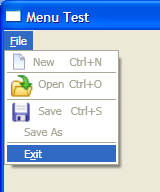
Nothing special there, right? I haven't bothered applying any styles or anything, so you would expect a fairly normal-looking File menu with the standard icons to the left of certain items.

Here's what you get when you run it:

Shonky WPF File Menu

WTF? For starters, some of the png icons have been scaled up, but the "new_document_16" file was unscaled. The menu items with icons don't line up vertically with those below. The keyboard hints to the right of the items don't align vertically either.

If this is the standard UI for menus, I can totally see why developers are avoiding them. Is it so hard to make a menu look like a standard Windows menu? Why do menus look like this by default in WPF?

Perhaps Paul, Douglas, Joseph or Josh could shed some light on this.

AWDNUG May

Last night's meeting of the Albury/Wodonga .NET User Group featured Microsoft's Ron Dunn, who came up to demonstrate SharePoint, and more specifically custom workflows. An hour and a half is, of course, way too short a time to cover any part of SharePoint with any depth, and we had a sizeable percentage of people in the room who had never seen the product at all, so the level of detail that Ron could go to was limited by necessity. That said, he did a great job not only of introducing SharePoint, but also of covering some of the more advanced topics like creating workflow activities in Visual Studio. A big thanks to Ron for making the trip and taking the time to shed some light on such a broad topic.

Ron assures me that he has a blog on the way, and will use it to publish more in-depth articles on workflow. Expect a link here when that goes live.

Next month I'll be sharing some of my recent experience with Windows Presentation Foundations, in a session that I think I'll call, "WPF: A Noob's Eye View". I hope to be able to do the bulk of the presentation outside of PowerPoint - maybe code something up from scratch. We'll see if I can pull that off.

On a semi-related note: Thanks to Pete for coming last night. It was his first AWDNUG meeting and I'd like to think it won't be his last. In fact, I'm sure we'd all love to see a presentation around XNA, which is his forte right now. How 'bout it, Pete?