Mad Props!

Omniscience is just a Google-search away.

Login

You're reading Mabsterama, the weblog of Matt Hamilton. Enjoy your stay.

Data Bars in DataGridView Revised!

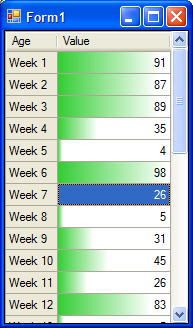
Here's a revised version of my "data bars in a DataGridView" code. This one introduces a small margin, and reworks the gradient fill slightly. It also makes the maximum value in the column represent 100% of the width of the data bar, so it's more like Excel 12's version.

First, the code (obviously dataBarColor is a private variable representing the colour of the data bar):

private void dataGridView1_CellPainting(object sender, 
    DataGridViewCellPaintingEventArgs e)
{ 
    DataGridView dgv = sender as DataGridView; 
    if (dgv.DataSource == null) return; 

    if (e.ColumnIndex == 1 && e.RowIndex >= 0)
    {
        if ((e.State & DataGridViewElementStates.Selected) 
            != DataGridViewElementStates.Selected)
        {
            Rectangle rect = e.CellBounds;
            e.PaintBackground(rect, true);
            rect.Offset(-1, 2);
            rect.Height -= 5;

            double value;
            double max = 0;
            for (int i = 0; i < dgv.RowCount; i++)
            {
                value = (double)dgv[e.ColumnIndex, i].Value;
                if (value > max) max = value;
            }

            rect.Width = max == 0 ? 0 : (int)((double)e.Value * rect.Width / max + 1);

            if (rect.Width > 0)
            {
                using (LinearGradientBrush lgb = new LinearGradientBrush(rect, 
                    dataBarColor, e.CellStyle.BackColor, 0.0))
                { 
                    Blend blend = new Blend(); 
                    blend.Factors = new float[] { 0, 0, 0.8f }; 
                    blend.Positions = new float[] { 0.0f, 0.3f, 1.0f }; 
                    lgb.Blend = blend; 
                    rect.Offset(1, 0); 
                    rect.Width -= 2; 
                    e.Graphics.FillRectangle(lgb, rect); 
                } 
            } 

            e.PaintContent(e.CellBounds); 
            e.Handled = true; 
        } 
    } 
} 

And a screenshot:

Data Bars in a DataGridView

Data Bars and DataGridView

A lot of people out there will by now have seen the screenshots of Excel 12 (now Excel 2007) and its excellent "data bars". For those that haven't, click here to read about them.

Now, we're working on a little application here that has a form where the user will need to enter a series of 30 percentage values. Seemed like a great use for a grid, and while I was at it I thought I'd try implementing data bars using DataGridView's CellPainting event. Here's my code:

 private void dataGridView1_CellPainting(object sender, DataGridViewCellPaintingEventArgs e) { DataGridView dgv = sender as DataGridView; if (dgv.DataSource == null) return; if (e.ColumnIndex == 1 && e.RowIndex >= 0) { if ((e.State & DataGridViewElementStates.Selected) != DataGridViewElementStates.Selected) { e.PaintBackground(e.CellBounds, true); Rectangle rect = e.CellBounds; rect.Offset(-1, 0); rect.Height--; rect.Width = (int)((float)e.Value * rect.Width / 100 + 1); if (rect.Width > 0) { using (LinearGradientBrush lgb = new LinearGradientBrush(rect, dataBarColor, Color.White, 0.0)) { rect.Offset(1, 0); rect.Width--; e.Graphics.FillRectangle(lgb, rect); } } e.PaintContent(e.CellBounds); e.Handled = true; } } } 

... and here's a screenshot:

Data Bars in a DataGridView

My Kingdom for an Official EPG

*sigh*

Just spent the better part of the afternoon setting up a new EPG for Windows Media Center.

Here in Australia we don't get an official, Microsoft-supplied EPG. Instead we have to use a series of third-party utilities that scrape web sites for TV guides, then reformat them into an XML format that MCE understands. It's a tiresome, time-consuming task setting it up, and running it takes ages, so you need to schedule it to run late at night.

As for why I needed to set it up again - well, for some reason my times were all out by 11 hours. It's as if Media Center suddenly thought I was in Greenwich or something. I couldn't find any cause for it, and installing the latest screen-scraper (FreeXMLTV) and guide-formatter (BladeRunner Pro) seems to have fixed it. For now.

Please, Microsoft. If you're listening: get us an officially-support EPG down under! You're in bed with the Nine Network, and they have TV guides on their site. Why can't you use them?

Moon Knight #1 - The Fun Stuff

Moon KnightOh my god! Check out the eleven page preview of Moon Knight #1 on Newsarama! The first episode of a new ongoing series! This is going to kick six kinds of ass! Can't wait!!!

Do you get the impression that I'm a big MK fan?

Microsoft Update and Windows Genuine Advantage - Solution

After much trial and error, a user on the microsoft.public.windowsupdate newsgroup (Bob Anderson) has posted a fix for those of us suffering the "Windows hangs when I try to access Microsoft Update" problem.

Turns out that there is some incompatibility between the nVidia IDE driver (not really used by my system anyway) and the Windows Genuine Advantage validation tool required by Microsoft Update.

So: All you have to do is go to "Add or Remove Programs", select "nVidia Drivers", and tell it to remove just the IDE driver. You will have to reboot, and after that, it all works perfectly.

Who'da thunk it? All's well that ends well, anyway.

A Rose by Any Other Name

Recently memnotk (sorry mate, I don't know your real name!) wrote a definition of RSS on his blog. He incorrectly referred to the term as an acronym, and I politely corrected him.

Now, memnotk is not a native English speaker, so he can easily be forgiven for getting something wrong that many native English speakers get wrong every day. An acronym is a word formed from the initials (and sometimes some supplementary letters) of other words. For example, "radar" is an acronym (an abbreviation of "RAdio Detection And Ranging"), whereas "RSS" (an abbreviation of "Really Simple Syndication", among other things) is not. You don't pronounce "RSS" as a word - you spell it out when you say it.

Since then, memnotk has looked up the definition of "acronym" on an online dictionary and posted it to his blog. Problem is, the dictionary he used got it wrong!

This is very disturbing. I don't know how many people use Webster's as their online dictionary, but perhaps you should switch to a better one now!

NO UPDATES FOR YOU!

Edit: Ken has pointed out that WGA doesn't get installed automatically - I must have installed it by visiting Microsoft Update. Still doesn't change the problem, though.

The other day I was playing around on my PC and noticed that it was downloading an update. When it had finished, I checked my "Add or Remove Programs" dialog to see what it was. Turns out it was the latest version of the Windows Genuine Advantage Validation Tool.

For those who don't know what the WGA program is: it's a method used by MS to ensure that you're not running a pirated version of Windows. I think they keep a registry somewhere of license keys that they know haven't been "compromised", and you can (voluntarily) check your Windows against that registry using this tool.

Now, although the program is voluntary, there are certain key benefits to using it. The main thing to keep in mind is that it's mandatory if you want to use Windows Update (now known as Microsoft Update). Attempting to do a scan for updates will always activate the WGA tool.

Now, my Windows is definitely genuine. I visit Microsoft Update all the time, and I'm running software that I've downloaded from MS which I couldn't have installed had I not been running a genuine copy of Windows (stuff like Windows Defender and IE7).

Imagine my surprise, then, when Microsoft Update froze my computer!

Ever since the latest WGA tool was installed (as part of visiting the Microsoft Update site and attempting to perform a scan) I have been unable to get to any page on Microsoft's web site that requires validation. Attempting to do so freezes every process on my PC, forcing me to power down (Ctrl+Alt+Del doesn't work either).

So I had a poke around the MS newsgroups, and found this thread. Turns out I'm not the only one!

Right now the going theory is that it's something to do with hardware. Those of us who have posted our PC specs to the thread are all running an Athlon64 CPU with an nForce motherboard.

Until this issue is resolved, I can't get to Microsoft Update, which sucks a fair bit. Other than that everything runs just fine ... so at least it's not preventing me from working on Comicster or (worse still) playing Minesweeper.

An ActionList for .NET 2.0

A little update on what I've been playing with in the .NET world recently.

Back in Delphi 3 (released around 1997 if memory serves), Borland introduced a great little component called TActionList. This component revolutionized the way we designed our applications, because it centralized all the UI logic in one place.

The concept, for those who never used Delphi, is that a TActionList is a collection of TAction components. Each TAction has properties you'd expect to see on a button or menu item - text, tooltip, enabled, visible etc etc. Every UI control in Delphi had an "Action" property, so that you could "hook them up" to the TAction they pointed to.

What made this revolutionary is that all your UI logic could be kept in one place. If you needed to lock the user out of a specific action, you'd simply disable that TAction component, and every menu item, toolbar button, link label etc would disable along with it. Likewise for other properties like Visible. TActionList even gave you a convenient "OnUpdate" event in which you could do all this UI updating.

The .NET framework, unfortunately, has no such component. If you have a MenuItem and ToolStripButton that both do the same thing, you have to remember to enable/disable both of them. WPF (formerly "Avalon") apparently introduces a new "command framework" that does this sort of stuff ... but that's no help to all us WinForms coders out there.

So I decided to write my own.

Basically I'm using the ExtenderProvider framework to add an "Action" property to all the UI controls that implement IButtonControl, and all the ToolStrip items. You can drop an ActionList component onto your form, define the Actions within it, and catch its Update event to tell the UI when to enable or disable each action. Each Action component has an Execute event in which you define what happens when that action gets executed.

The great part about this is that you can use the action itself to go back and update the UI. Check out this example of a "View|Toolbar" menu item. I'll do it all in code so you can see what goes on.

 private MadProps.Windows.Action viewToolbar; private void Form1_Load(object sender, EventArgs e) { // create a viewToolbar action viewToolbar = new MadProps.Windows.Action(); viewToolbar.Text = "Toolbar"; viewToolbar.ToolTipText = "Shows or hides the toolbar"; viewToolbar.Execute += viewToolbar_Execute; // create our actionlist and add viewToolbar to it MadProps.Windows.ActionList al = new MadProps.Windows.ActionList(); al.Actions.Add(viewToolbar); al.Update += al_Update; // assign the viewToolbar action to the "View|Toolbar" menu item al.SetAction(viewToolbarMenuItem, viewToolbar); } void al_Update(object sender, EventArgs e) { viewToolbar.Checked = toolStrip1.Visible; } void viewToolbar_Execute(object sender, EventArgs e) { toolStrip1.Visible = !viewToolbar.Checked; } 

So now we have a fully-functioning "View|Toolbar" menu item, whose "Checked" property is kept up-to-date by the action itself.

I'll continue to refine this component - I want to use it in Comicster. If you would like a copy, let me know.

Office 2007 UI Screenshots

Jensen Harris has released a bunch of screenshots of the official UI for Office 2007.

I think the final look of the ribbon is really slick. Love the use of colour, and the idea of being able to apply different "skins" to the UI will be welcome to those in different lighting conditions where maybe the light-blue is not as readable as, say, black and white.

Right On, Target!

Oh my god! Just got home and was leafing through the junk mail ...

Check out Target's latest catalogue! It's grammatically correct! I gave it a quick once over and couldn't find a single error! They use apostrophes correctly in words like kids', boys', girls', women's and men's!

So just to show that I'm not all about the negatives, here's a big "well done" to Target. Great work, folks.